Trade your plan.
Not your tilt.
The revenge entry after a stop-out. The fifth trade past your plan. Untilt sits under your chart and keeps the rule visible when you are most likely to break it.
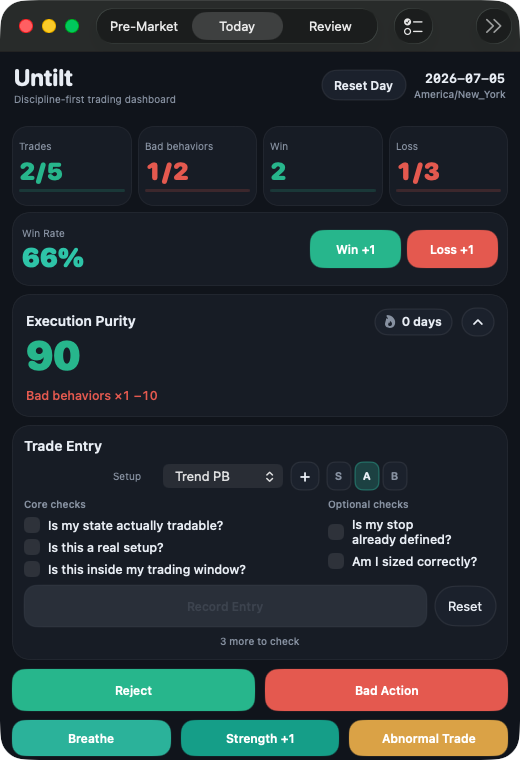
The HUD


Today's clearance: Full · Cautious · Watch · Halt. Set at premarket. Always visible.
Log a win or a loss — ⌥⌘W, ⌥⌘L. One tap, no dialog. Losses feed the cooldown engine.
Trades taken vs. your daily cap. 3 / 3 means you're done.
Your process score, live. Moves on discipline, not dollars.
Countdown after a loss streak. The timer runs whether you like it or not.
⌥⌘E confirm · W win · L loss · R reject · B breathe · V voice note · H hide. Hands stay on the keyboard.
No chart. No prices. No P&L blinking at you. Just the six things that decide whether you keep your edge today — 44 points tall, docked under your chart.
So how does a bar that touches nothing change anything? It can only lock what it owns — its own confirm-and-log flow. The checklist, cooldown, and Hard Mode can disable buttons inside Untilt. The order still goes through your broker's software, on your keys — that part was always yours, and it stays yours.
Four moments. One copilot for each.
Are you fit to trade today?
Before the open, you set your clearance: Full, Cautious, Watch, or Halt. Slept badly, down on the week, distracted — you say so now, while you're still honest. The HUD carries that call into every entry.
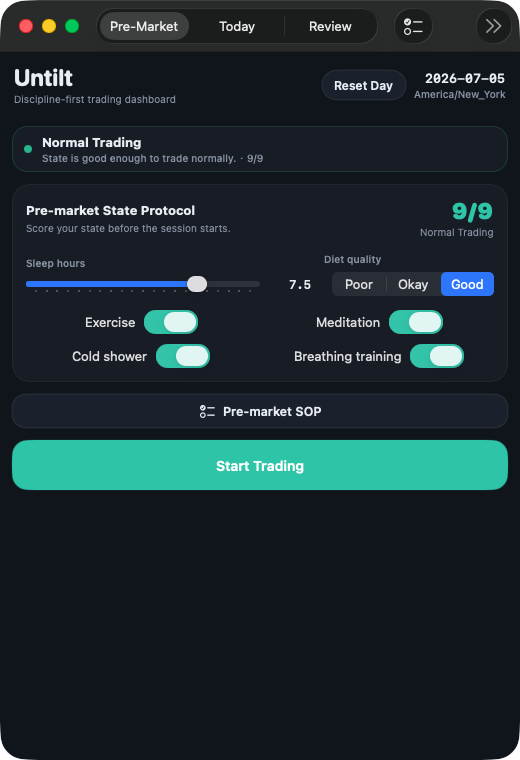
Does this one actually fit your system?
⌥⌘E pulls your setup checklist. Three seconds: is this your A+ pattern, or are you reaching? Confirm and it's logged against your plan. Reject and it never counts against your streak.
What stops you when you're tilted?
Two losses in a row starts a cooldown inside Untilt. Reach your plan cap and additional entry checks can be locked in the app. Keep overriding your stop-hand reminder and the behavior is recorded for review. Your broker and account remain outside Untilt.
THE PART YOU PAY FORWhat actually happened in there?
Three minutes, four questions, one focus for tomorrow. Structured so you can't hand-wave it. Play back the voice notes you took mid-session — ⌥⌘V, straight from the HUD — and hear what your head actually sounded like in the moment. Export the log clean for your own analysis, or simply close the loop inside Untilt.
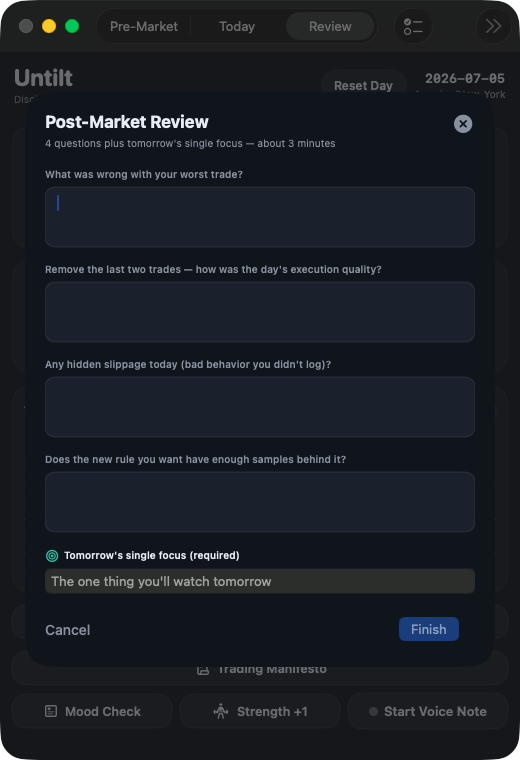
A 44pt bar that lives where you look
Your discipline shouldn't need a window — and tracking your trades shouldn't cost you one either. Untilt's HUD docks under your chart at 44 points tall: zero screen taken, yet the whole session gets logged — every win, loss, reject and rule break, two keystrokes each. Menu-bar icon for a glance, global hotkeys for the rest. You open the main window twice a day: premarket ritual, post-close review. The other seven hours, it's just the bar. And you, behaving.
Hard Mode locks the door you keep opening
You know the moment: cooldown's running, the setup looks perfect, and past-you would just click through. Turn on Hard Mode and that Untilt button is locked. Two ways out — a 60-second breathing drill, or one honest line of review. No password override, no "just this once." You opt in when you're calm, so the tilted version of you can't change the in-app rule without a reset. The lock is inside Untilt, not on your account.
Score the process, not the P&L
Green days can be bad days. A revenge trade that happened to win is still a broken rule, and Purity docks it. The score only tracks process: trading in cooldown, blowing past your plan count, ignoring a stop-hand, skipping the premarket ritual. Keep it clean and your streak builds — no-trade days don't break it. For once, the number on the screen rewards the right thing.
What Untilt will never do
Discipline tools that can touch your money aren't discipline tools. Here's what's off the table, permanently.
No login, no OAuth, no API into your account. There's nothing to link.
It can't buy, sell, size, or close. It can only change controls inside Untilt; execution stays entirely yours.
You already have those. Untilt watches your behavior, not the tape.
It won't tell you where price is going. That's not the job.
Your trading log stays on your Mac. Billing runs through Apple, and Untilt does not run a cloud account system.
Local-first by design. Your log lives on your Mac, not our server. It never touches your broker. Its locks stay inside Untilt.
Your system. Your rules. Your checklist.
Four starting systems — Price Action, ICT, Scalping, Swing — get you running on day one. They're starting points, not prescriptions: every piece of Untilt bends to how you actually trade.
- Your setups & entry checklist — rename them, reorder them, add the check only you need
- Your daily caps & cooldowns — set the trade limit and timer to your plan, not a default
- Your premarket SOP — build the routine item by item; it's a checklist you wrote, so you'll actually run it
- Your review questions — replace the four built-ins with the ones that cut deepest for you
- Your trade declaration — the sentence you sign before the open is in your own words
- Your data — the whole day exports clean, so your own model can run the autopsy
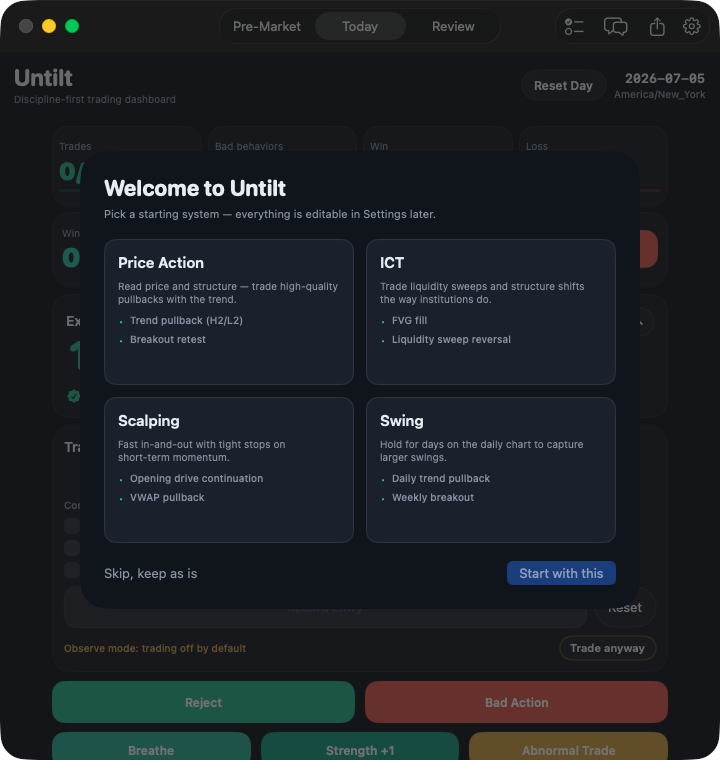
Pick a starting system on day one, then bend the rules, caps, and cooldowns to your own plan.
Every trader who lasts has a premarket routine.
Untilt ships with one — sleep, state, readiness. Then you rebuild it, item by item, until it reads like you:
Questions traders actually ask
I'm running a prop eval — FTMO, Topstep. Does this help?
Will it touch my broker or trading account?
Where is my data stored?
Do I need an account?
Why no chart? Every other tool has one.
It connects to nothing. So how does it actually stop me?
What about the trial and billing?
Pricing
Start with the free discipline loop. Upgrade to Pro when you want active intervention and deeper review.
- HUD, hotkeys, and manual trade logging
- Built-in checklists and same-day review
- Seven days of local history
- Active intervention and Hard Mode
- Custom routines and unlimited history
- Full review, voice notes, and export
- All Pro features
- Annual subscription
- 14-day free trial for eligible new subscribers
Current prices and terms are shown in the app. Subscriptions renew automatically unless canceled at least 24 hours before the current period ends. Manage or cancel in your Apple Account settings.
The account you save is your own.
Set your clearance, dock the bar, and keep the rule visible when your judgment gets loud. Download free from the Mac App Store. Untilt never touches your broker.
Download Free on the Mac App Store